

Bosch Ovens Symbols


Bosch Oven Symbols: What Do They Mean?
Understanding the symbols on your Bosch oven’s control panel is the key to unlocking its full potential. Whether you’re roasting, baking, grilling, or simply warming up leftovers, knowing which setting to use will help you cook with confidence. Here’s a handy guide to the most common Bosch oven symbols and their meanings.
Common Bosch Oven Symbols
| Symbol Name | Symbol Description | What It Means |
|---|---|---|
| Pyrolytic cleaning |
 |
Heats the oven to around 480°C, which reduces dirt and grease deposits to dust that can be easily wiped away. |
| Keep Warm |
 |
For cooking cooked food warm. |
| Fast heat |
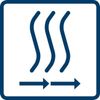 |
For those times when you need your food ready more quickly, select fast heat to warm the oven faster. |
| Full width variable grill |
 |
Select this oven grill symbol if you want to grill large quantities with ease |
| Bottom Heat |
 |
Uses only the bottom heating element for slow cooking. |
| 3D/4D Hot Air |
 |
Circulates hot air for multi-level cooking, perfect for several dishes. |
| Pizza Setting |
 |
Combines bottom heat and fan for a crispy base and even cooking. |
| Gentle Hot Air |
 |
Gentle hot air for delicate dishes on a single shelf. |
| Defrost |
 |
Gently warms to defrost food without cooking. |
| Oven Light |
 |
Turns the oven light on or off. |
| Programmes |
 |
Used to set cooking times or select automatic programmes. |
Tips for Using Your Bosch Oven
- Choose the right setting for your dish—fan oven for even roasting, grill for browning, pizza setting for homemade pizzas.
- Use the timer to avoid overcooking and set reminders for multi-stage recipes.
- Refer to your user manual for symbols specific to your model and for advanced functions like self-cleaning or child lock.
Why Understanding Symbols Matters
Knowing what each symbol means helps you:
- Get the most out of your oven’s features
- Avoid cooking mishaps
- Keep your appliance running efficiently
For a full list of symbols and more details, always refer to your Bosch oven’s user manual or visit the official Bosch website.